! 不同的版本:
- CrewAI Enterprise
- CrewAI UI Studio
- CrewAI Open-Source Framework
- CrewAI Crews - Autonomous solutions with AI teams of Agents with different roles.
- Choose Crews when you need autonomous problem-solving, creative collaboration, or exploratory tasks.
- CrewAI Flows - Structured automations by dividing complex tasks into precise workflows.
- Choose Flows when you require deterministic outcomes, auditability, or precise control over execution._
- CrewAI Crews - Autonomous solutions with AI teams of Agents with different roles.
Core concepts
- Agent
- Task
- Crew
- Tools
- Context
YAML Configuration to define agent
!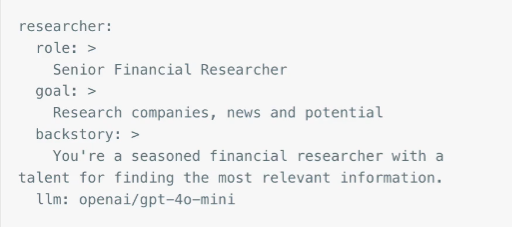
When creating an agent, we can just simply select the configuration as follows:
agent = Agent(config=self.agents_config[‘researcher’])
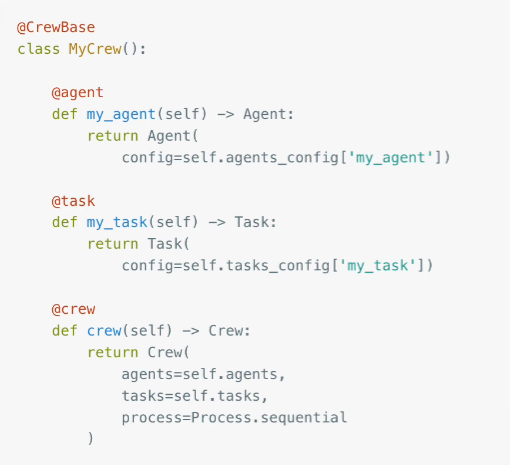
crew.py
It all comes together with a Crew definition
!
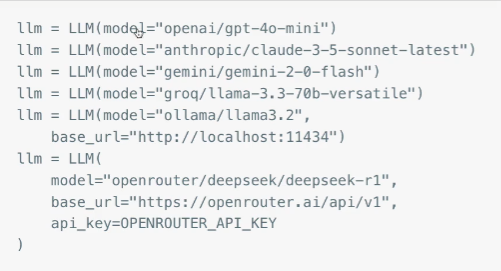
LLMs
CrewAI uses the super-simple LiteLLM under the hood to interface with almost any LLM; set keys in .env file. Not like LangChain, which comes with a fair amount of structure. LiteLLM is almost nothing.
!
Five Steps:
- Create the project with crewai create crew my_project
- Fill in the config YAML files to define Agent and Task
- Complete the crew.py module to create the Agent, Task and Crew, referencing the config
- Update main.py to set any config
- Run crewai run
uv tool install crewai
crewai create crew my_crew // Create a new project, aka an entire directory structure
my_crew
src
my_crew
config
agents.yaml
tasks.yaml
crew.py
main.py
Then
- Structured output
- Custom tool
- Hierarchical process
More deeper - Memory, makes it more perscriptive#
Five different types of memory
- Short-term memory
- Long-term memory
- Entity
- Contextual memory
- User memory
Read other posts